
Intensity Casino App Download and What It Actually Is
A Download button rides the top of every Intensity screen like a spruiker outside a shopfront. Behind it sits a file the operator hands out itself — no store listing, no review queue, no spec sheet.
Daily Free Bonus · Apps Bonus
$2
Paid by Intensity for installing its app
- The Apps Bonus tile sits under DAILY FREE BONUS on the operator's own promotions page
- Distribution is direct — the file is not listed on Google Play or the App Store
- Not one spec is published — no version, no size in megabytes, no OS floor
- On iPhone the honest route is a home-screen shortcut, not a native install
- Direct download from the operator, no store middleman
- $2 credited for the install, per the promo page
- iOS gets a Safari shortcut rather than an app package
- Zero published specs — we print the blanks as blanks
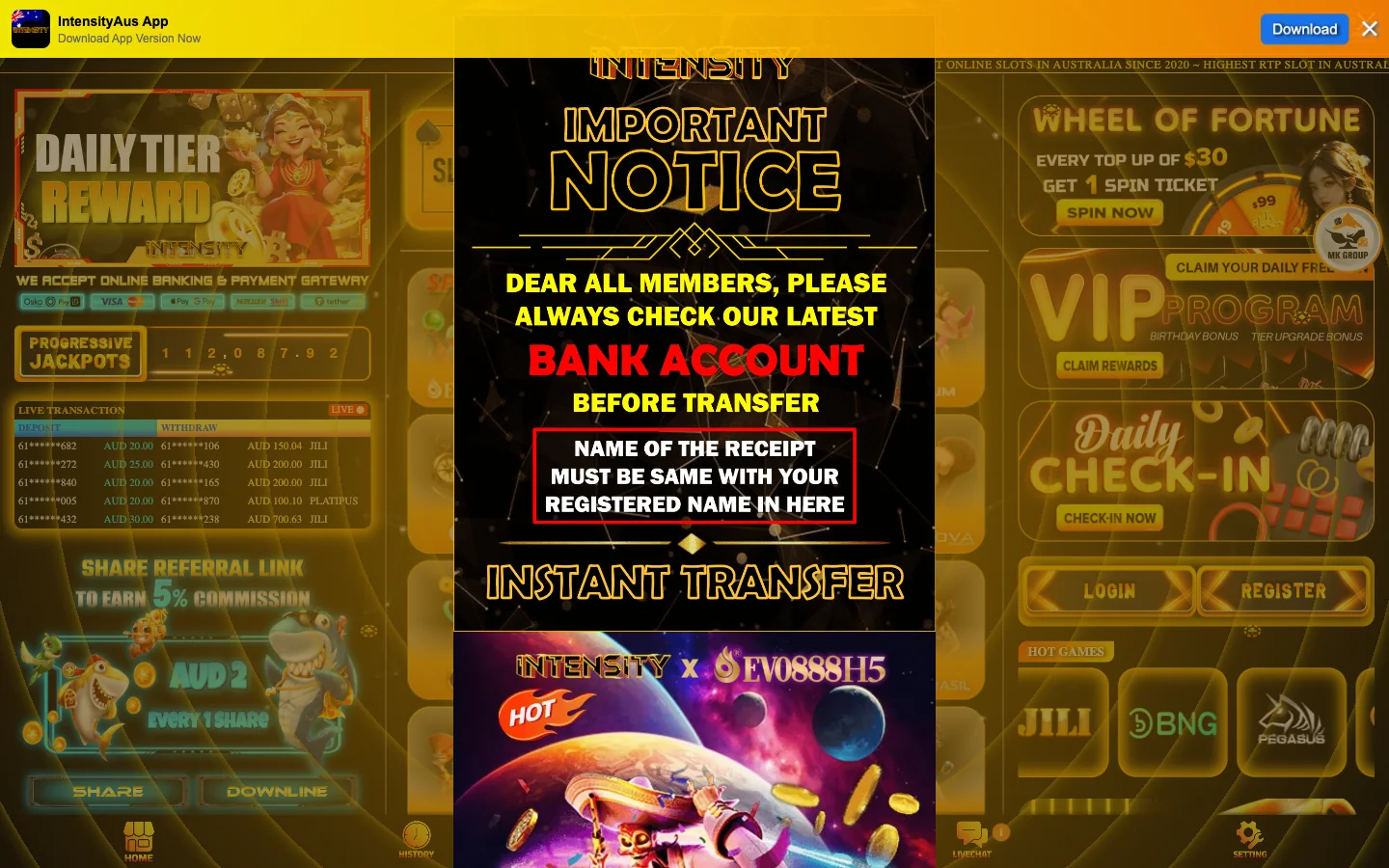
The Intensity Casino App Bar You See on Every Screen
Load any page on the operator's site — front page, promotions grid, sign-in screen — and a slim bar clings to the top edge. The wording is "IntensityAus App — Download App Version Now", and a Download button sits at its right edge. That bar never dismisses itself and never changes wording, which tells you how badly the operator wants the install.
Tap it and nothing opens in a store. No Google Play listing, no App Store card with screenshots and a developer name, no five-star row. The button points at a file the operator serves from its own infrastructure, which makes this a sideload and puts the judgement on you rather than on a platform reviewer.
That is normal for the segment Intensity sits in. Google and Apple both refuse real-money gambling apps unless the operator holds a licence recognised where the download happens, and Intensity publishes no licence at all, so the store route was never open to it.
Our one opinion here: a permanent, undismissable download bar is pushy interface design. It is also honest about what it is, which beats the pages telling you to search "Intensity Casino" on Google Play.
Installing the Intensity App on an Android Phone
Android is where the actual package lands. The flow below is what Android 8.0 and later put in front of you, and it involves two consent screens that people routinely mistake for errors. Neither is a bug. Both exist because the operating system wants a human to sign off on a file that did not come from the Play Store.
- Open the site in your usual browserGo to the Intensity site in Chrome, Samsung Internet or Firefox on the handset itself. The download bar is served to mobile browsers as well as desktop, so it will already be sitting at the top of the screen.
- Tap Download in the top barThe browser starts pulling an .apk file and drops it into your Downloads folder. A notification appears when it finishes. Do not use a download manager app to grab it — let the browser own the file.
- Give that one browser install permissionTap the finished download and Android will say the browser is not allowed to install unknown apps. This is granted per-app, not through a single global switch as it was years ago: the toggle you flip belongs to Chrome specifically, and it stays with Chrome afterwards. Settings then sends you back to the install.
- Read the Play Protect screen and choosePlay Protect scans the package and shows a warning because the developer is unregistered with Google. You have to consciously accept it to continue. Anyone who tells you this screen never appears has not installed the file.
- Open the app and sign inAn Intensity icon lands in your launcher. Sign in with the mobile number and password you already use — the app carries no separate account. Our page on the Intensity login covers the 61-prefix format the field expects.
One housekeeping habit is worth building: turn the browser's install permission back off once you are done. Four taps, and the next stray file cannot ride the same open door.
If the install refuses outright: the usual causes are full storage and a work profile that blocks unknown sources by policy. Neither produces a helpful message. Check free space, then check whether an employer manages the phone.
Intensity runs the same in a browser tab while you decide
You do not need the package to open an account or to claim anything. The mobile site handles registration, the SMS code and the promotions grid perfectly well, and the app can wait until you know you like the place.
Get your SMS codeGetting Intensity Onto an iPhone Without an App Store
Here is the part most pages fudge. There is no iOS package. Apple permits installs from the App Store and, in a few European markets, from marketplaces it has approved — neither door is open to Intensity here. So the iPhone route is a web shortcut, and calling it anything else would be a lie.
Open the Intensity site in Safari, tap the Share icon in the bottom toolbar, scroll the sheet to Add to Home Screen, rename it if you like, then tap Add. An Intensity icon appears among your other apps. Launch it and the site fills the screen with no address bar and no tab strip.
What you get is useful and limited in equal measure: one tap from the home screen, a session that usually survives between launches, a rounding error of storage. It is still Safari underneath, running the same site your browser was already showing.
The upside nobody mentions is that it loads the live site, so it updates the moment the operator does — no install prompt, no stale build, no review queue. Whether that counts as an app depends on how pedantic you feel. It is the only thing an iPhone can honestly give you here.
What Intensity Does Not Publish About Its App
A store listing is a disclosure form as much as a download page: version string, file size, minimum OS level, named developer, update date. Intensity's download bar carries a word and a button. The table prints those gaps rather than filling them.
| Detail | Published by Intensity? | What that means before you tap |
|---|---|---|
| Version number | No | You cannot tell whether today's file differs from the one someone fetched in March. |
| File size | No | Nothing to check the download against — the cheapest tamper test there is. |
| Minimum Android version | No | Older handsets may install and then behave oddly rather than being refused up front. |
| Developer or publisher name | No | An MK GROUP badge, no registered entity, and no verified signer you can look up. |
| Permissions requested | No | Android lists them at install time, so read that screen carefully. |
| Release notes or update date | No | No changelog and no "last updated" stamp anywhere on the operator's pages. |
| iOS build | Not applicable | No iPhone package exists; the Safari shortcut above is the whole story. |
Competing write-ups fill that table with confident numbers — 24 MB, Android 5.0 and up, version 3.2.1. None of those figures exists on the operator's site. Seven honest blanks beat seven invented specifications: a blank you can plan around, a fabrication you cannot.
The AUD 2 Apps Bonus Intensity Pays for Installing
Scroll the operator's promotions page to the DAILY FREE BONUS block and there it is: Apps Bonus, AUD 2, sitting between an AUD 1 tile called Free Chips 365 Days and an AUD 2 Share Bonus. Small money — but it is the only casino app in this segment we have seen put a public price on the install, and every other page about Intensity misses it.
Read it as a nudge payment. An icon on your launcher gets opened far more often than a bookmark does, and AUD 2 is a cheap way to buy that. Knowing the motive does not make the credit less real.
What the promo page does not state, and we will not guess at: whether the AUD 2 lands automatically or needs a claim tap, whether the tile resets like the other daily bonuses, and what turnover applies before it can be withdrawn. No wagering multiplier is published against any Intensity bonus. Live chat is where you settle that before counting the money.
Worth keeping in proportion: AUD 2 is one tenth of AUD 20, the lowest figure the operator's live deposit ticker has shown. Install the app because it suits how you play, not for the credit.
App or Mobile Browser: Which Way Into Intensity
Both routes reach the same lobby, the same promo tiles and the same account. The differences are practical rather than dramatic, and one of them — what happens when a domain moves — matters more than the rest combined.
| Point of difference | Operator app (Android) | Mobile browser |
|---|---|---|
| Effort to get started | Download, a permission toggle, a Play Protect screen, then install. | Type the address. That is the whole process. |
| Updates | Manual. No store means no automatic update, so a fresh download is the only path to a newer build. | Automatic — you load the current site every time. |
| Storage used | Unknown, since no file size is published. Budget for a normal casino package. | Cache only, clearable whenever you like. |
| Push notifications | Possible once installed; nothing is published about what it sends or how to mute it. | None unless you allow web notifications yourself. |
| The AUD 2 Apps Bonus | Available, because you installed something. | Not available. The AUD 2 Share Bonus is the browser-side equivalent. |
| If the operator changes domain | Should keep working if it resolves the new address internally, but you cannot verify that from outside. | An old bookmark breaks — annoying, and a useful signal that something moved. |
| iPhone equivalent | Does not exist. | Safari, optionally with the home-screen shortcut. |
If you play a few nights a week and like your tiles claimed on time, the app earns its place. Still working out whether you trust the operator? Stay in the browser. You keep the ability to walk away by closing a tab, and you lose nothing but AUD 2.
Staying Safe With an Operator-Distributed Intensity APK
One rule covers this whole topic. The only file worth installing is the one behind the download bar on the operator's own site, reached by typing the address yourself. Not a mirror, not a file-locker link, not an APK aggregator, and not a Telegram forward from a stranger in a punting group.
The reason is mechanical. An Android package can be unpacked, altered and repacked by anyone with free tooling, and casino apps are a favourite target because the repackaged copy sits in front of a login and a bank transfer. Aggregators cannot verify what they host, and Intensity publishes no file size or signature to check a mirror against.
So: go to the source, use the bar, accept the Play Protect screen knowingly rather than reflexively, and revoke the browser's install permission afterwards. That is the whole procedure, and doing it takes less time than reading about it.
Intensity App Questions Australians Ask
No. Searching the Play Store for Intensity returns nothing belonging to this operator. The package is served straight from the casino's own site through the download bar pinned to the top of every page, which is why the install runs as a sideload rather than a store download.
Not as a real app. Apple allows installs from its own store only, and Intensity has no listing there. What you can do is open the site in Safari, tap Share, then Add to Home Screen. That gives you an icon that opens the site full-screen, without the browser furniture.
None of the three. No version string appears on the download bar or anywhere else public, no file size is given, and no minimum Android release is named — so keep a few hundred megabytes free and expect your browser's own progress bar to be the only number you see. What is knowable is Android's own behaviour: from 8.0 onwards, permission to install unknown apps is granted to one app at a time, so it goes to the browser doing the download and to nothing else. Any page quoting you a version or a file size for this app invented it.
Because Play Protect flags any package whose developer is not registered with Google, and Intensity is not. The warning describes the source, not the contents — it is not a virus detection. You have to accept it deliberately for the install to proceed.
Yes. An Apps Bonus of AUD 2 sits in the DAILY FREE BONUS block of the operator's promotions page, next to Free Chips 365 Days at AUD 1 and a Share Bonus at AUD 2. Whether it credits automatically or needs a claim tap is not stated.
No. The app opens onto the same account as the website. You sign in with the mobile number you registered and the password you set at sign-up, and your balance, claim tiles and history follow you between the two without any transfer step.
There is no store to push updates, and the operator publishes no update mechanism, so assume nothing happens automatically. If a newer build exists, fetching it means returning to the download bar. The iPhone home-screen shortcut has no such problem, since it loads the live site each time.
Don't. Third-party mirrors are a well-worn route for repackaged gambling apps, and because Intensity publishes no file size or signature, you have nothing to check a mirror's copy against. Use the download bar on the operator's own site and no other source.
New to the site rather than to the app? Start with the SMS sign-up walkthrough, then the sign-in screen. The wider picture of what this casino is sits on the Intensity Australia page.