
Intensity Casino Login With Your Australian Mobile Number
Nearly every page written about this casino tells you to enter an email address. There is no email box on the form. What Intensity wants is the phone in your pocket, typed a particular way.
The form, as it actually appears
61…
Mobile No / Username · Password
- The first field is labelled Mobile No / Username and carries 61480050689 as its own example
- The password box takes 6 to 20 characters, and nothing outside that range is accepted
- A green LOGIN button sits below both fields
- Under "Do Not Have An Account Yet?" there is an orange REGISTER button and a Forgot Password link
- 61 replaces the leading zero on your number
- 11 digits once the conversion is done
- 6–20 characters allowed in the password box
- SMS is the only channel that reaches your account
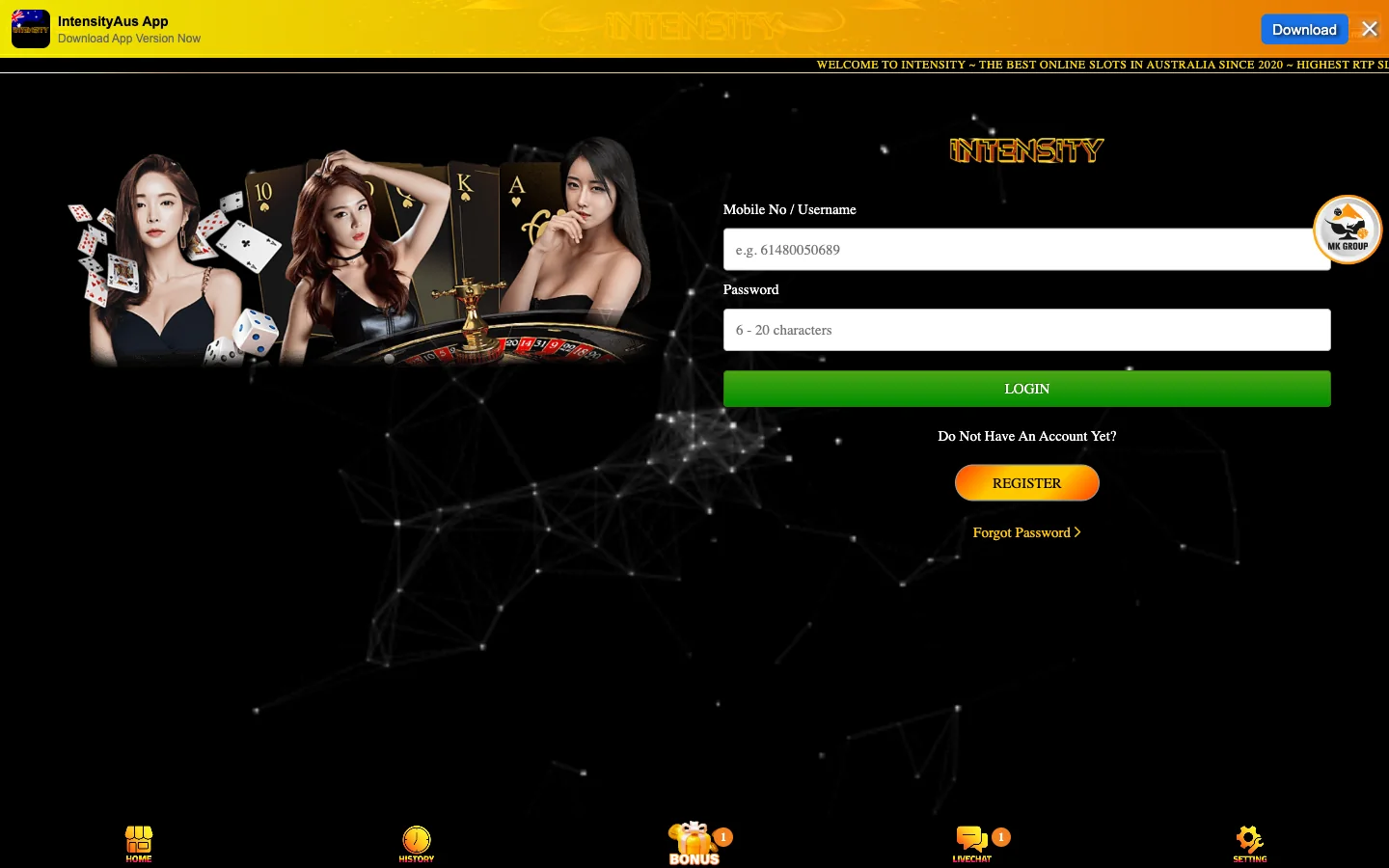
What the Intensity Casino Login Screen Asks For
Two boxes. That is the whole form. The top one reads Mobile No / Username, the one below takes your password, and a green LOGIN button finishes the job. No captcha, no security question, no second screen.
The slash in that label misleads people, so let us settle it. Intensity is not offering a choice between a phone number and some handle you invented at sign-up — the number is the username. Registration collects your full name, your mobile, a password and an optional referrer code, and from then on your phone number is how the system knows you.
The proof sits inside the field. Before you type anything, Intensity shows a faint example: 61480050689. Read it slowly. That is an ordinary Australian mobile, 0480 050 689, with the zero swapped for a country code. If your attempt fails on the first field, formatting is the likeliest reason.
The password box has one published rule: between 6 and 20 characters. No capital, digit or symbol is demanded, and no strength meter appears. Our view on that is unenthusiastic — a six-character floor on an account holding real AUD is thin, so treat the upper bound as an invitation.
Writing Your Australian Mobile Number the Way Intensity Wants It
The rule in one line: delete the 0 at the front of your mobile number, put 61 in its place, and close up every space. Ten digits become eleven, and that string goes in the Mobile No / Username box.
| How you normally write it | What you type at Intensity | Why |
|---|---|---|
| 0412 345 678 | 61412345678 | Zero removed, 61 added, spaces closed up |
| 0480 050 689 | 61480050689 | The exact example printed inside the field |
| 0491 570 006 | 61491570006 | Eleven digits after conversion, every time |
Four things break this, and all four are common. A leading plus sign is how your contacts app stores the number, and it is not what the placeholder shows. Keeping the old zero gives you 610412345678, which is twelve digits and wrong. Pasting from a contact card drags spaces along with it. A landline cannot be used at all, since the code has to land somewhere.
Count the digits before you press LOGIN. Eleven, starting 614.
One consequence deserves its own line. Because your identity here is a phone number, there is nothing to forward, nothing to alias and no inbox that can be recovered separately. Your account and your SIM are welded together.
Signing In to Intensity on a Phone Versus a Desktop
The credentials are identical everywhere. The same eleven digits and the same password open the mobile site in Chrome or Safari, the desktop version on a laptop, and the build the operator pushes from the bar at the top of every screen. No separate app account, no pairing code.
What changes is the friction. On a phone the number keypad appears as you tap the first field, and iOS often offers to fill in your own number — which it inserts as +61 4xx xxx xxx, formatted for a dialler rather than for this form. Strip the plus and the spaces. On a desktop the risk runs the other way, where a password manager that stored your credentials under a guessed username quietly refills the wrong string every visit.
Since no email sits in the loop, a sign-in problem cannot be solved from a work laptop while your phone charges at home. Any step involving a code needs the handset with the SIM in it. Intensity documents no session length anywhere, so we cannot tell you when the site drops you; clearing browser data ends it straight away. The download itself is covered on our Intensity app page.
No Intensity account to sign in to yet?
The form that creates one takes four fields and a single SMS code, and your balance sits in AUD from the first minute. New players can ask live chat for the AUD 66.33 credit before funding anything.
Get your SMS codeWhen the Intensity Login Will Not Go Through
Most failed attempts here trace back to formatting or to the phone, not to the password. Find the symptom that matches yours before you assume the account is gone.
| Symptom | Likely cause | What to try |
|---|---|---|
| The password is rejected | A stored password from another site, a capital added by autocorrect, or a string that was never valid | Type it by hand rather than letting the manager fill it, and check the length — under 6 or over 20 characters cannot be what you set. Still bouncing? Use Forgot Password instead of guessing again. |
| The page will not load on mobile data | Carrier-level filtering, a lookalike domain, or a VPN exit the site rejects | Try home Wi-Fi; if it loads there, the block belongs to your carrier. Switch any VPN off, since a foreign exit address changes what the site sees. Check you are on the operator's real address, not one of the near-identical domains we discuss in our review of what checks out. |
| The account appears locked after repeated attempts | Unknown — Intensity publishes no lockout rule, no attempt limit and no cooling-off period | Stop retrying, because more attempts cannot help when the threshold is unknown. Open live chat and give them the mobile number on the account. That is the only route: no self-service unlock exists and no email fallback exists. |
| New phone or new SIM, the code goes nowhere | The number registered to the account no longer reaches the device in your hand | A new handset with the same number is fine — sign in as normal. A new number is an account matter rather than a password matter, and no form on the site changes it. Live chat again, with your registered full name and the bank account name you deposit from. |
Notice that the last two rows end in the same place. Intensity publishes no lockout policy, no support email address and no ticket system, so once the problem moves past your own typing there is exactly one channel, and it is the live chat window.
Resetting a Forgotten Intensity Password
The Forgot Password link sits directly under the login fields, in the same block as the REGISTER button. Since no address was ever collected, the reset cannot travel by email — it runs back through the mobile number you sign in with. Have the handset unlocked in front of you before you start, then keep these in mind while you set the replacement.
- Stay inside 6 to 20 characters. A manager generating a 32-character string produces something the field refuses, and you will blame the wrong step.
- Do not reuse your banking password. Deposits run as transfers from your everyday account, which makes that overlap a poor idea.
- Store the converted number with it. Keep 61412345678 beside the password, so future you is not re-deriving the format at midnight.
- Expect nothing in writing. There is no confirmation email, because there is no email. A successful sign-in is the only receipt.
One opinion, freely given: set the new password on a laptop if you can. A mobile keyboard is where the stray capital creeps in, and this form gives you no strength meter to catch it.
Keeping an Intensity Casino Account Yours
Phone-number accounts carry a security profile of their own. Anyone holding your unlocked handset can read the code. Anyone who knows your mobile number already knows half your credentials, because that number is not a secret — you hand it to cafés, delivery drivers and mailing lists without thinking twice.
So the password carries the whole load, and it is the only part of the pair you actually control. Six characters is the floor Intensity allows; treat that floor as a warning rather than a target.
SIM changes deserve separate thought. Porting your number to a new carrier keeps the account reachable, because the number travels with you. A fresh number does not, and that is where players discover they cannot log in and cannot prove ownership from a keyboard. Sort it with the casino while the old SIM still works.
Two last habits. Bookmark the operator's real address so you never reach the sign-in page through a search result, since lookalike domains around this brand are a genuine problem. And if any message asks for your Intensity password, treat it as fake — no legitimate support process starts that way. The name-match rule behind all of this is unpacked in our sign-up walkthrough.
Intensity Login Questions From Australian Players
Your mobile number, written with the 61 country code. The field is labelled Mobile No / Username, but the slash does not mean you pick a handle — registration never offers one. The example inside the box, 61480050689, shows the shape expected.
Yes, and the leading zero comes off at the same time. A number written as 0412 345 678 goes in as 61412345678, no spaces and no plus sign. Eleven digits beginning 614 is correct; twelve means the zero stayed.
Use the Forgot Password link under the two fields. Recovery runs through your registered mobile rather than an inbox, so keep the handset nearby. The replacement must fit the same 6 to 20 character range, and no confirmation message follows.
The operator publishes no attempt limit, no lockout duration and no unlock procedure, so nobody outside the company knows the threshold. Anyone quoting a number of tries invented it. Stop guessing and open live chat with your registered number ready.
No. The code belongs to the sign-up, not to the sign-in — the login screen asks for a number and a password and nothing else. If a code request appears when you are only trying to get back in, you are on the registration route rather than the login one; the sign-up walkthrough covers that side.
Nothing published says either way, and the operator documents no session policy at all. Treat every device you have signed in on as still signed in until you deliberately sign out of it, which is the safer assumption and costs you nothing.
A new phone keeping the same number changes nothing. A genuinely new number is another matter, because the credential itself has changed and no page lets you edit it. Speak to live chat while the old SIM still works.
Yes. One set of credentials covers the build the operator distributes from its top bar and the site you reach in Chrome or Safari, with no separate registration and no pairing step. Same balance, same claim tiles, same history.
Ready to go in? The SMS sign-up walkthrough covers the four fields that create the account, and the front page lays out what this casino actually offers Australian players.